
When using a Front with Azure Api Management, the IP address returned is that of the front, not the client. With the implementation of an Application Gateway, it is the IP (v6) of the app gateway which is transmitted to API Management.
What's the problem? A problem arises if we wish to restrict IP at the API management level.
Solution :
Application Gateway
Propagate the client IP from the APP Gateway to API Management using a redirect.
Add this rule in Rewrites / Rewrite rule:
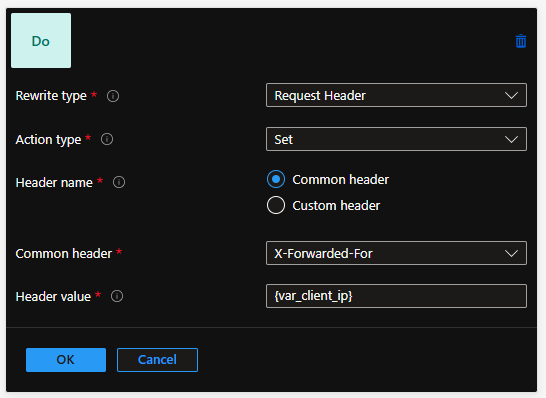
Pay attention to the naming of the variable "var_client_ip"
Api Management
Modify the ip-filter filter rule with a check-header rule:
<set-header name="X-Forwarded-For" exists-action="override">
		<value>@{
				string xForward = context.Request.Headers.GetValueOrDefault("X-Forwarded-For");
				return xForward.Contains(",") ? xForward.Split(',')[0] : xForward;
				}</value>
</set-header>
<check-header name="x-forwarded-for" failed-check-httpcode="403" failed-check-error-message="Unauthorized" ignore-case="true">
		<value>ipX</value>
		<value>ipY</value>
</check-header>
Commentaires (0)
Aucun commentaire pour le moment. Soyez le premier à commenter !
Laisser un commentaire